728x90
리니어 레이아웃 (LinearLayout )
박스모델
한쪽 방향으로 차례대로 뷰를 추가하며 화면을 구성함
android:orientation="vertical"
하위 뷰들을 수직방향으로 배치
android:orientation="horizontal"
/하위 뷰들을 수평방향으로 배치
match_parent
부모 레이아웃 길이에 맞춰짐
wrap_content
입력할 글자 혹은 이미지 크기에 맞춰짐
android:background="#000000"
background color변경
android:clickable="false"
클릭불가
android:rotation="45"
45도만큼 기울임
android:enabled="false"
비활성화
예제풀어보기
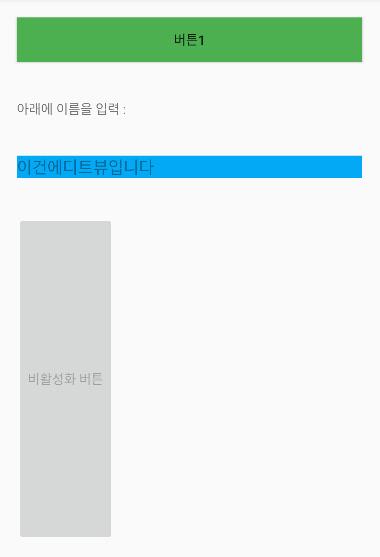
풀이
<Button
    android:id="@+id/btn1"
    android:layout_width="match_parent"
    android:layout_height="wrap_content"
    android:layout_margin="20dp"
    android:background="#4CAF50"
    android:text="버튼1" />

<TextView
    android:layout_width="match_parent"
    android:layout_height="wrap_content"
    android:text="아래에 이름을 입력 :"
    android:layout_margin="20dp"
    />
<EditText
    android:layout_width="match_parent"
    android:layout_height="wrap_content"
    android:hint="이건에디트뷰입니다"
    android:background="#03A9F4"
    android:layout_margin="20dp"/>

<Button
    android:layout_width="wrap_content"
    android:layout_height="match_parent"
    android:text="비활성화 버튼"
    android:enabled="false"
    android:layout_margin="20dp"

   />
728x90
'안드로이드' 카테고리의 다른 글
| 안드로이드 스튜디오 - SQLite, DB CRUD (0) | 2022.04.11 |
|---|---|
| 안드로이드 - 리스트뷰, 그리드뷰 (0) | 2022.04.08 |
| 암시적 인텐트 (0) | 2022.04.08 |
| 안드로이드 - 메뉴 (0) | 2022.04.05 |
| 안드로이드스튜디오 - 레이아웃의 종류 (0) | 2022.03.31 |






최근댓글