자주 사용되는 레이아웃
리니어레이아웃(LinearLayout) - 선형 레이아웃
레이아웃의 왼쪽 위부터 아래쪽 또는 오른쪽으로 차례로 배치한다
orientation 속성
리니어레이아웃의 가장 기본적은 속성이다 값은 vertical과 horizontal을 설정할 수 있다
vertical - 리니어레이아웃 안에 포함될 위젯의 배치를 왼쪽 위부터 수직방향으로 쌓겠다
horizontal - 리니어레이아웃 안에 포함될 위젯의 배치를 왼쪽 위부터 수평방향으로 쌓겠다
gravity, layout_gravity 속성
gravity 속성 - 레이아웃 안의 위젯을 어디에 배치할 것인지 결정(left,right,center,top,bottom을 사용)
2개를 조합하여 ( left|bottom )처럼 사용할 수 있음
layout_gravity 속성 - 자신의 위치를 부모(주로 레이아웃)의 어디에 위치시킬지 결정
layout_weight 속성 - 리니어레이아웃을 여러 개 사용할 경우 각 레이아웃의 크기를 지정해야하는데
layout_weight 속성을 사용해 개별 하위 요소에 가중치를 할당할 수 있음
자세한 내용 👇👇
선형 레이아웃 | Android 개발자 | Android Developers
LinearLayout은 세로 또는 가로의 단일 방향으로 모든 하위 요소를 정렬하는 뷰 그룹입니다. LinearLayout이 서로 스택된 상태에서 레이아웃 방향을 지정할 수 있기 때문에, 세로 목록에는 행 하나당 하
developer.android.com
렐러티브레이아웃(RelativeLayout) - 상대 레이아웃
위젯 자신이 속한 레이아웃의 상하좌우 위치를 지정하여 배치하거나 다른 위젯으로부터 상대적인 위치를 지정한다
렐러티브레이아웃 안에 포함된 위젯은 렐러티브레이아웃의 어디쯤에 위치시킬 것인지 지정해야한다
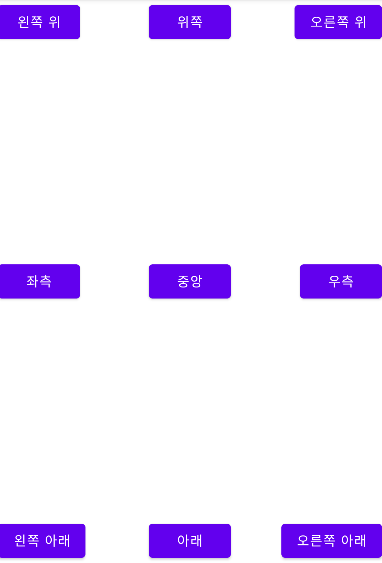
렐러티브레이아웃 안에 포함된 위젯의 속성 중 부모(레이아웃)의 어느 위치에 배치할지를 결정하는 속성은 7가지
layout_alignParentLeft 속성
layout_centerHorizontal 속성
layout_alignParentRight 속성
layout_alignParentTop 속성
layout_centerVertical 속성
layout_alignParentBottom 속성
layout_centerInParent 속성
코드
<Button
    android:layout_width="wrap_content"
    android:layout_height="wrap_content"
    android:text="중앙"
    android:layout_centerInParent="true"
    />

<Button
    android:layout_width="wrap_content"
    android:layout_height="wrap_content"
    android:text="좌측"
    android:layout_centerVertical="true"
    android:layout_alignParentLeft="true"
    />

<Button
    android:layout_width="wrap_content"
    android:layout_height="wrap_content"
    android:text="우측"
    android:layout_centerVertical="true"
    android:layout_alignParentRight="true"
    />

<Button
    android:layout_width="wrap_content"
    android:layout_height="wrap_content"
    android:text="위쪽"
    android:layout_centerHorizontal="true"
    android:layout_alignParentTop="true"
    />

<Button
    android:layout_width="wrap_content"
    android:layout_height="wrap_content"
    android:text="아래"
    android:layout_centerHorizontal="true"
    android:layout_alignParentBottom="true"
    />

<Button
    android:layout_width="wrap_content"
    android:layout_height="wrap_content"
    android:text="왼쪽 위"
    android:layout_alignParentLeft="true"
    android:layout_alignParentTop="true"/>

<Button
    android:layout_width="wrap_content"
    android:layout_height="wrap_content"
    android:text="오른쪽 위"
    android:layout_alignParentRight="true"
    android:layout_alignParentTop="true"/>

<Button
    android:layout_width="wrap_content"
    android:layout_height="wrap_content"
    android:text="왼쪽 아래"
    android:layout_alignParentBottom="true"
    android:layout_alignParentLeft="true"/>

<Button
    android:layout_width="wrap_content"
    android:layout_height="wrap_content"
    android:text="오른쪽 아래"
    android:layout_alignParentBottom="true"
    android:layout_alignParentRight="true"/>
자세한 내용 👇👇
상대적 레이아웃 | Android 개발자 | Android Developers
RelativeLayout은 상대 위치에 하위 뷰를 표시하는 뷰 그룹입니다. 각 뷰의 위치는 동위 요소(예: 다른 뷰의 왼쪽 또는 아래)에 상대적이거나 상위 RelativeLayout에 상대적인 위치로 지정될 수 있습니다.
developer.android.com
프레임레이아웃(FrameLayout)
위젯을 왼쪽 위에 일률적으로 겹쳐서 배치하여 중복되어 보이는 효과를 낼 수 있다
여러개의 위젯을 배치한 후 상황에 따라서 필요한 위젯을 보이는 방식에 주료 활용된다
테이블레이아웃(TableLayout)
행과 열의 개수를 지정한 테이블 형태로 위젯을 배열한다
그리드레이아웃(GridLayout)
테이블레이아웃과 비슷하지만 행 또는 열을 확장하여 다양하게 배치할 때 편리하다
'안드로이드' 카테고리의 다른 글
| 안드로이드 스튜디오 - SQLite, DB CRUD (0) | 2022.04.11 |
|---|---|
| 안드로이드 - 리스트뷰, 그리드뷰 (0) | 2022.04.08 |
| 암시적 인텐트 (0) | 2022.04.08 |
| 안드로이드 - 메뉴 (0) | 2022.04.05 |
| 안드로이드 스튜디오 -기초 (0) | 2022.03.29 |





최근댓글